Matter Pressure and Temperature Sensor
Overview
The Matter Pressure and Temperature Sensor is a Matter-compatible SED device that reads temperature and pressure data from a BMP280 sensor and exposes the readings as Matter attributes.
This section describes the development of a Matter-compatible temperature and pressure sensor.
Source Code: GitHub
Prerequisites:
ESP-IDF development environment is set up.
ESP-Matter development environment is set up.
ESP32-H2-DevKitM-1 is available.
Hardware Assembly
Wiring BMP280 to ESP32
The ESP32-H2 development board reads data from the BMP280, a low-power sensor designed for battery-powered devices. They communicate using I2C (Inter-Integrated Circuit), a serial, synchronous, half-duplex protocol. The ESP32 has two I2C ports, each capable of operating as a controller or target. In this project, the ESP32-H2 acts as the controller, while the BMP280 functions as the target.
The I2C bus has two lines: the Serial Data Line (SDA) and the Serial Clock Line (SCL). On the ESP32-H2, SDA and SCL can be assigned to any available GPIO pins.
On the ESP32-DevKitM-1, GPIO21 is used for SDA, and GPIO22 is used for SCL.
The table below shows the connections for the BMP280 sensor to the ESP32-DevKitM-1 microcontroller:
BMP280 Pin | ESP32 Pin |
|---|---|
VCC | 3.3V |
GND | GND |
SDA | GPIO21 |
SCL | GPIO22 |
SDO | GND |
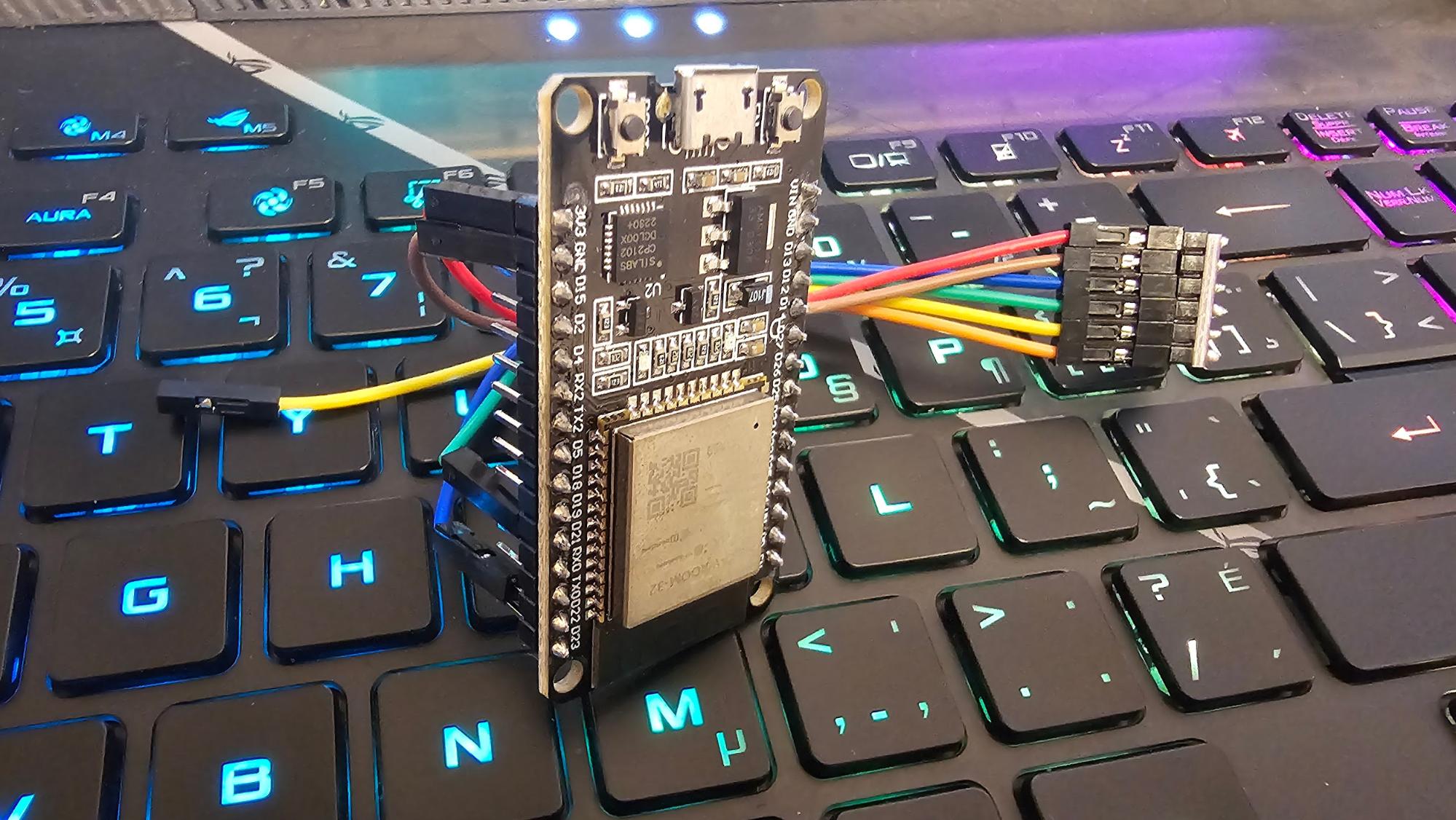
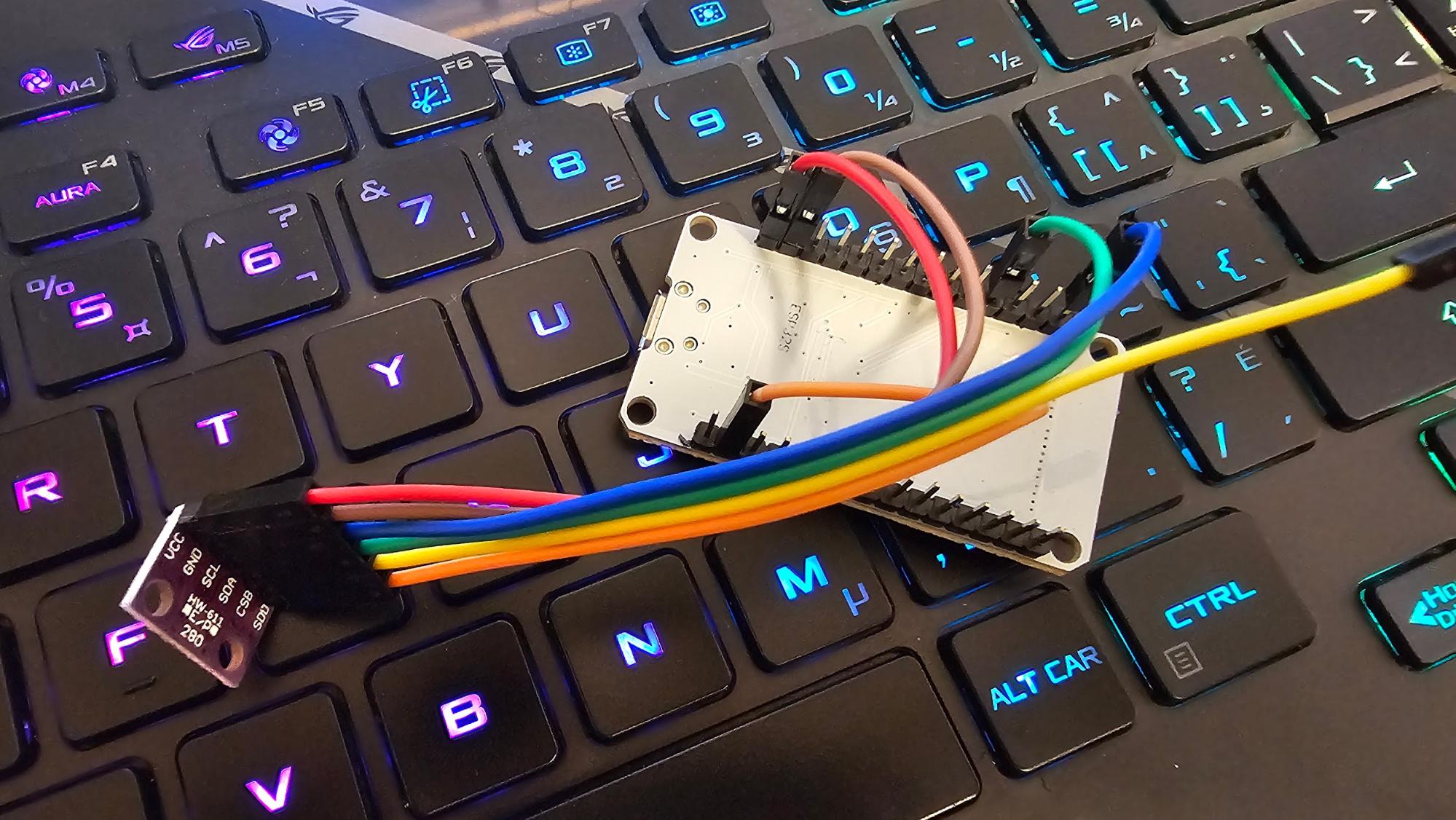
The pictures below show the connections for the BMP280 sensor to the ESP32-DevKitM-1 microcontroller:
Testing I2C Connectivity
The I2C tools from ESP-IDF examples were used to test communication with the sensor device.
The following command configures the I2C bus with specific GPIO number, port number and frequency:
The following command scans an I2C bus for devices and output a table with the list of detected devices on the bus:
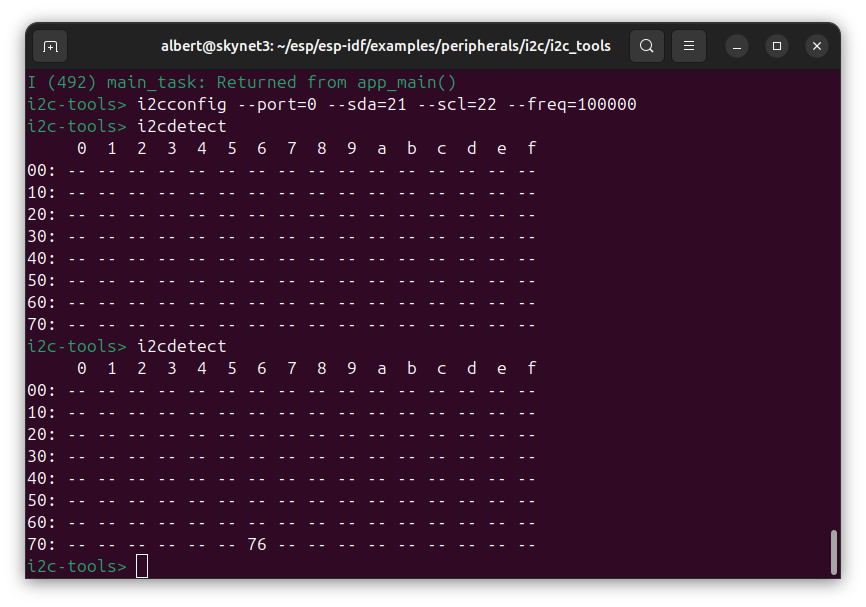
It displays the address 0x76 since the SDO pin is connected to GND.
The following command get the value of the “ID” register which contains the chip identification number chip_id, which is 0x58:
-c option to specify the address of I2C device (acquired from i2cdetect command).
-r option to specify the register address you want to inspect.
-l option to specify the length of the content.
Firmware Development
The firmware for the ESP32-H2 was developed using the ESP-IDF framework.
The BMP280 datasheet (BST-BMP280-DS001-26) is used as a reference during development.
Project Bootstrap
Driver Component Development
The command below creates a new component named bmp280_driver inside the components directory.
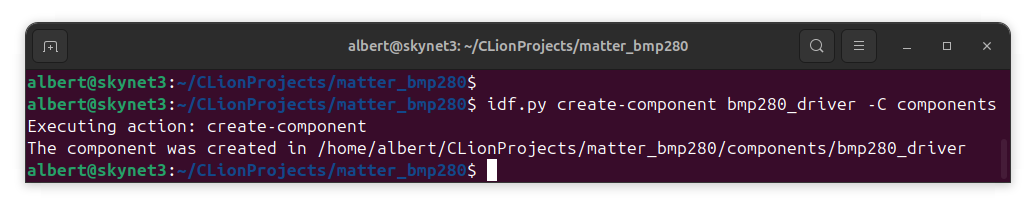
The ESP-IDF framework includes a driver for working with I2C devices. To ensure that this component can use the driver, the REQUIRES directive must be added to components/bmp280_driver/CMakeLists.txt as follows:
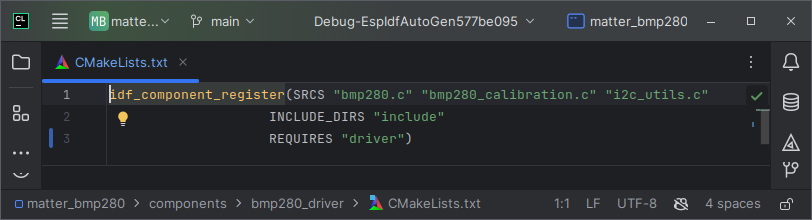
This directive ensures that the build system includes the I2C driver as a dependency for the component during the build process.
The i2c_utils.h header file declares utility functions for initializing, managing, and performing operations on an I2C master bus and its connected devices.
The i2c_utils.c file implements these functions and includes driver/i2c_master.h ($IDF_PATH/components/driver/i2c/include/driver/i2c_master.h) to access the driver’s API in controller mode.
The BMP280 code is designed according to the specifications outlined in the BST-BMP280-DS001-26 datasheet. Communication with the sensor is performed through read and write operations on its 8-bit registers.
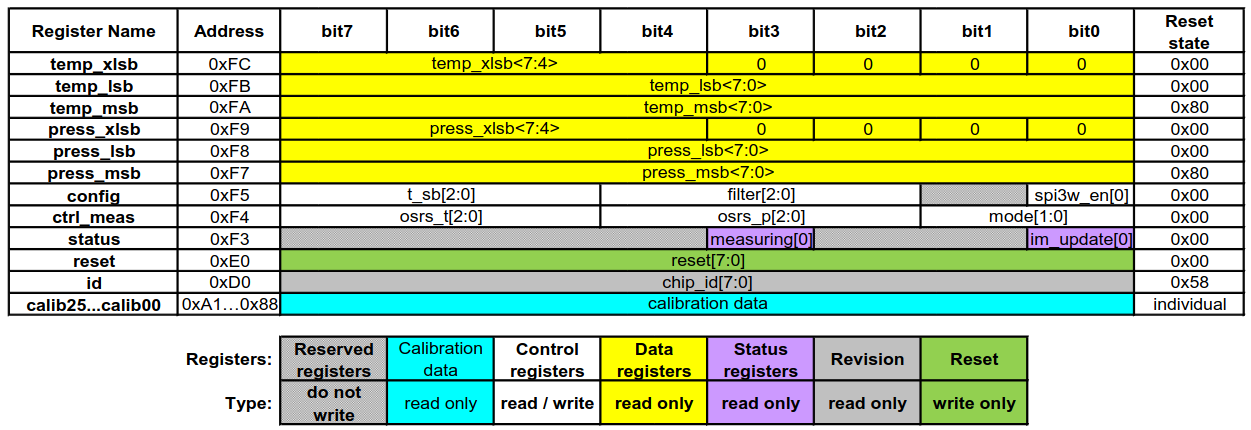
The bmp280_driver.h header file declares the configurations, constants, and functions needed to interface with and operate the sensor, based on the datasheet.
The bmp280_driver.c file implements these functions, providing support for sensor initialization, configuration, and data handling. It adheres to the datasheet to verify the sensor, apply compensation to raw measurements, and configure parameters like oversampling, operating modes, and filters.
The BMP280 sensor uses factory-programmed calibration parameters to adjust raw data for accurate measurements. These parameters are stored in the sensor's non-volatile memory (NVM) during production, are unique to each device, and cannot be modified by the user, as described in Section 3.11.2 of the datasheet. The bmp280_calibration.h header declares the constants, structures, and functions needed to handle this calibration data. It includes functionality to read the parameters and apply them to raw pressure and temperature readings. The bmp280_calibration.c file implements these functions, following the temperature and pressure compensation formulas specified in Section 3.11 of the datasheet.
Matter Component Development
The command below creates a new component named bmp280_driver inside the components directory.
The matter_temperature_sensor.h file defines functions for managing a Matter-compatible temperature sensor.
The matter_temperature_sensor.c file implements these functions using Espressif’s Matter SDK, built on the Matter SDK.
In the Matter ecosystem, devices are represented as Nodes, which consist of Endpoints representing specific functions, such as temperature measurement. Endpoints are organized into Clusters that group related features. This implementation sets up a Node with an Endpoint for temperature measurement, configures its Clusters, and manages communication within the Matter network.
Integration of BMP280 Driver with ESP-Matter
The bmp280_driver component outputs temperature and pressure readings as 32-bit signed integers (int32_t), following the BMP280 datasheet specifications. These integers are used to process the sensor’s raw 20-bit data for precise calculations, including compensation and scaling. The readings represent scaled real-world values to preserve decimal precision using integer arithmetic. For example, a temperature of 25.25°C is stored as 2525 (in units of 0.01°C), and a pressure of 1013.25 is stored as 101325 (in Pascals).
During integration with ESP-Matter, an issue arose because ESP-Matter defines attributes like measured_value, min_measured_value, and max_measured_value in its Temperature and Pressure Measurement Clusters using the nullable< int16_t> data type. This required the BMP280’s outputs, represented as int32_t, to be reduced to fit within the int16_t range of -32,768 to 32,767. The BMP280 outputs temperature values within a range of -40°C to +85°C and pressure values within a range of 300 hPa to 1100 hPa. For temperature, no additional scaling was necessary because even the maximum value, when scaled (e.g., 85.00°C becomes 8500), fits comfortably within the int16_t range without any loss of precision.
For pressure, however, scaled values can exceed the limit of the int16_t range. Multiplying higher values by 100 to preserve decimal precision increases their magnitude beyond the int16_t limit. For example, a pressure of 1013.25 becomes 101325 when scaled, which far exceeds the int16_t range.
To address this, the scaling approach was modified. Instead of multiplying by 100 to represent hundredths of Pascals, pressure values were scaled by 10. This reduced the magnitude of the scaled values, allowing them to fit within the int16_t range. For example, a pressure of 1013.25 is scaled to 10132, which fits comfortably within the range. Similarly, the maximum pressure of 1100.00 is scaled to 11000.
Reading the Temperature
To manage temperature readings, two approaches were considered:
Regularly poll the temperature sensor, for example, using a timer. Each new reading is written directly to the attribute’s stored value.
Update the temperature reading only when a client requests it. In this approach, the sensor retrieves the latest temperature data and writes it to the attribute before responding to the client.
The second approach requires a mechanism to dynamically fetch the latest sensor data during a client read operation. ESP-Matter provides native support for callbacks during attribute write operations, but not for reads. In the ESP-Matter repository on GitHub, Issue #264 includes a discussion about using the ATTRIBUTE_FLAG_OVERRIDE flag to implement such functionality. The discussion describes a workaround involving modifications to the framework’s internal esp_matter_attribute.cpp file to override the default attribute behavior and introduce custom read logic.
A more maintainable alternative would be to leverage the flag directly within application code. This approach avoids modifying the framework itself. However, it introduces additional complexity and can cause delays in client responses, as the sensor data must be fetched in real-time for each read request. Due to these challenges, the first option was chosen for its simplicity and faster response times.
Testing
Testing with CHIP-Tool
Refer to CHIP-Tool for more details.
Connecting to Google Home
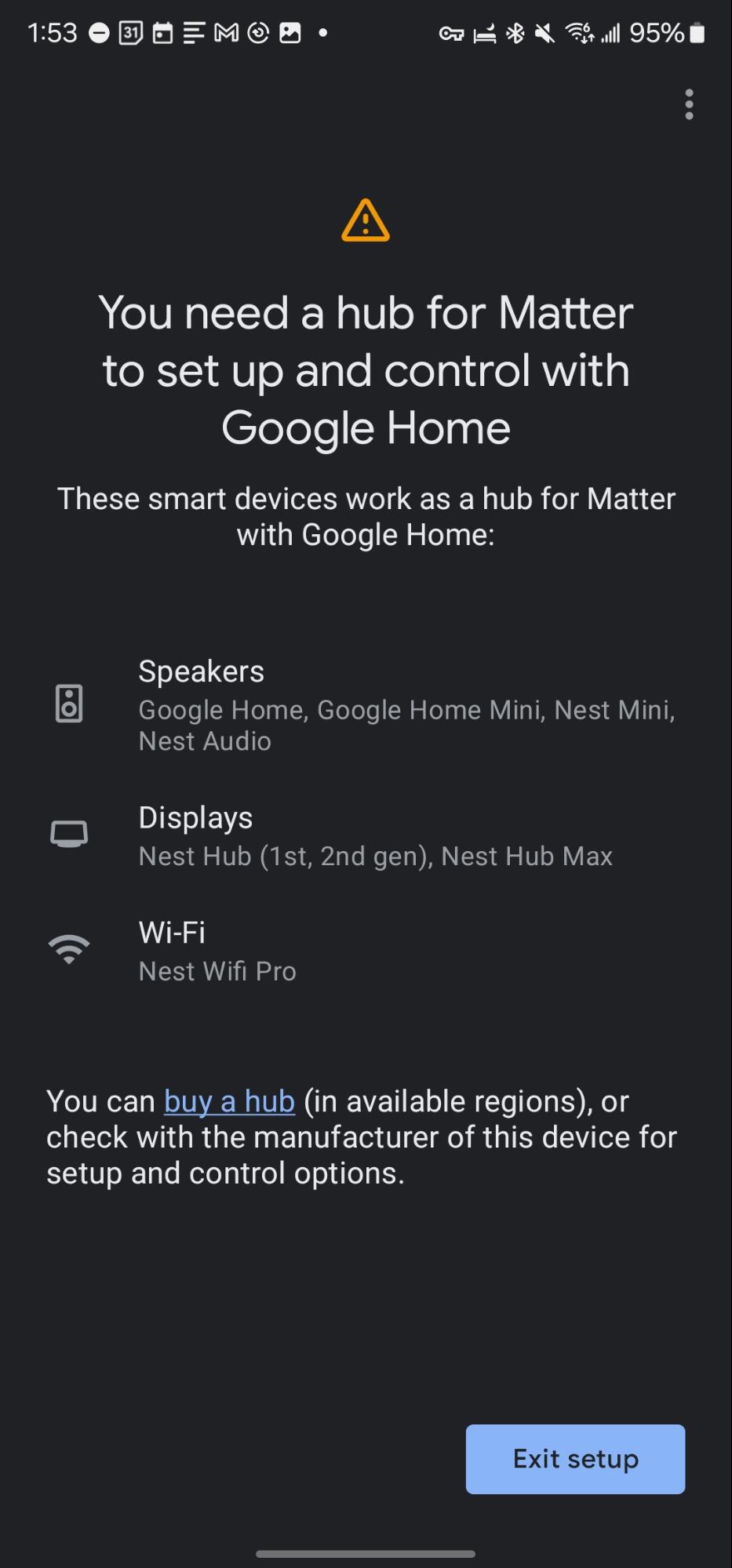
It is also possible to use third-party software, such as the Google Home app, as a controller. However, the device appears offline in Google Home despite being successfully commissioned. To address this issue, a structured troubleshooting process was undertaken:
Flash Memory Reset: The device’s flash memory was erased to remove any residual configurations that could interfere with its functionality.
Network Configuration Check: It was confirmed that both the mobile device and the hardware were connected to a 2.4 GHz Wi-Fi network, as the system does not support 5 GHz networks.
Device Reset: The hardware was reset to ensure proper initialization and resolve any temporary issues.
Vaishali Avhale, Associate QA Engineer at Espressif Systems, provided feedback on a related issue in the Espressif ESP-Matter GitHub repository (Issue #1125). She tested the system using a Google Nest Hub 2nd Generation as a hub and confirmed that it worked correctly in this configuration. She noted that a hub device is a required component for proper operation within Google's ecosystem.