ESP OpenThread CLI
This section describes how to build and run the OpenThread CLI example project from the ESP-IDF. It can be used to test and debug the OpenThread stack on ESP32 series SoCs.
Prerequisites:
ESP-IDF development environment is set up.
ESP32 series development board is available. This example is tested on ESP32-H2-DevKitM-1.
Build and Run
Step 1: Prepare the Environment
Step 2: Set target
The following command sets the target device to ESP32-H2:
Step 3 (Optional): Configure Device
The example can run with the default configuration. idf.py menuconfig can be used for customized settings:
Enabling Joiner Role:
Component Config → OpenThread → Thread Core Features → Enable Joiner
Step 4: Connect to Computer
Connect the ESP32-H2-DevKitM-1 to the computer using a USB cable.
Step 5: Build and Flash
Usage
Joining Thread Network
A Thread device can join the network using either a minimal dataset (providing only the Network Key) or a complete Active Operational Dataset.
Example 1: Joining with Minimal Provisioning (Network Key Only)
The device is initially provisioned with only the Network Key. After joining, the device synchronizes with the network and automatically receives the complete Active Operational Dataset.
Display the full Active Operational Dataset:
Example 2: Joining with the Full Active Operational Dataset
In this method, all network parameters (such as PAN ID, channel, Mesh-Local Prefix, etc.) are provisioned upfront. The device is configured with the complete dataset before starting the Thread interface.
Commissioning
Joiner device:
Get the factory-assigned IEEE EUI-64 address (e.g.,
744dbdfffe63f5c8).eui64Bring the IPv6 interface up, enable the Thread Joiner role, and start the Thread protocol:
ifconfig up joiner start J00MMM thread start
Commissioner device:
Start the Commissioner role:
commissioner startAdd a joiner entry:
commissioner joiner add <eui64|discerner> <pksd>Example:
commissioner joiner add 744dbdfffe63f5c8 J00MMM or commissioner joiner add * J00MMMDisplay all Joiner entries in table format:
commissioner joiner table
The Joiner device receives the Network Key when joining the network.
Retrieving Information
The command router table prints a list of routers in a table format. Each router is identified by its Extended MAC.
The command extaddr returns the Extended MAC address of a device.
The joiner id command returns the Joiner ID used for commissioning.
Sending UDP packets
Running UDP Server:
Sending a UDP packet and closing the server:
Running UDP Client:
Sending a UDP packet and closing the client:
Scanning and Discovering
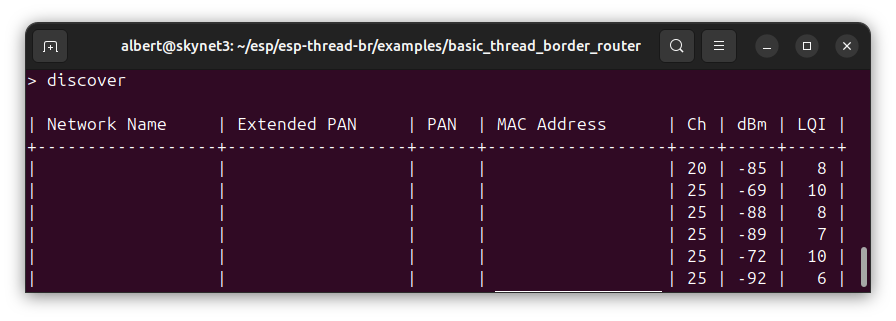
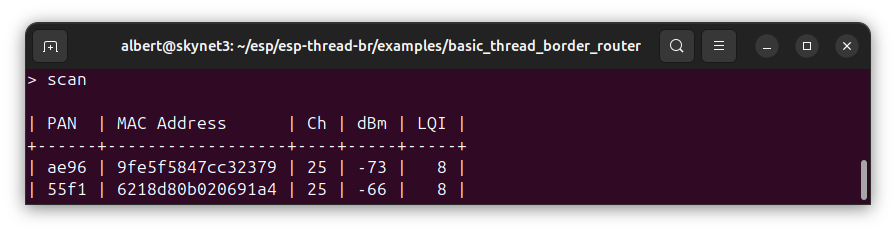
The scan command performs IEEE 802.15.4 scan to find nearby devices. The discover command performs an MLE Discovery operation to find Thread networks nearby.
References
ESP Thread Sniffer:
https://docs.espressif.com/projects/esp-zigbee-sdk/en/latest/esp32h2/developing.html#sniffer-and-wireshark
https://openthread.io/guides/pyspinel/sniffer
https://github.com/espressif/esp-idf/blob/master/examples/openthread/ot_rcp/README.md